
Data Import brings records from another system or a spreadsheet into Garage Invoice. Every importer works the same way: upload a file, match its columns, review, then import. Nothing is imported until you confirm.
Import a file
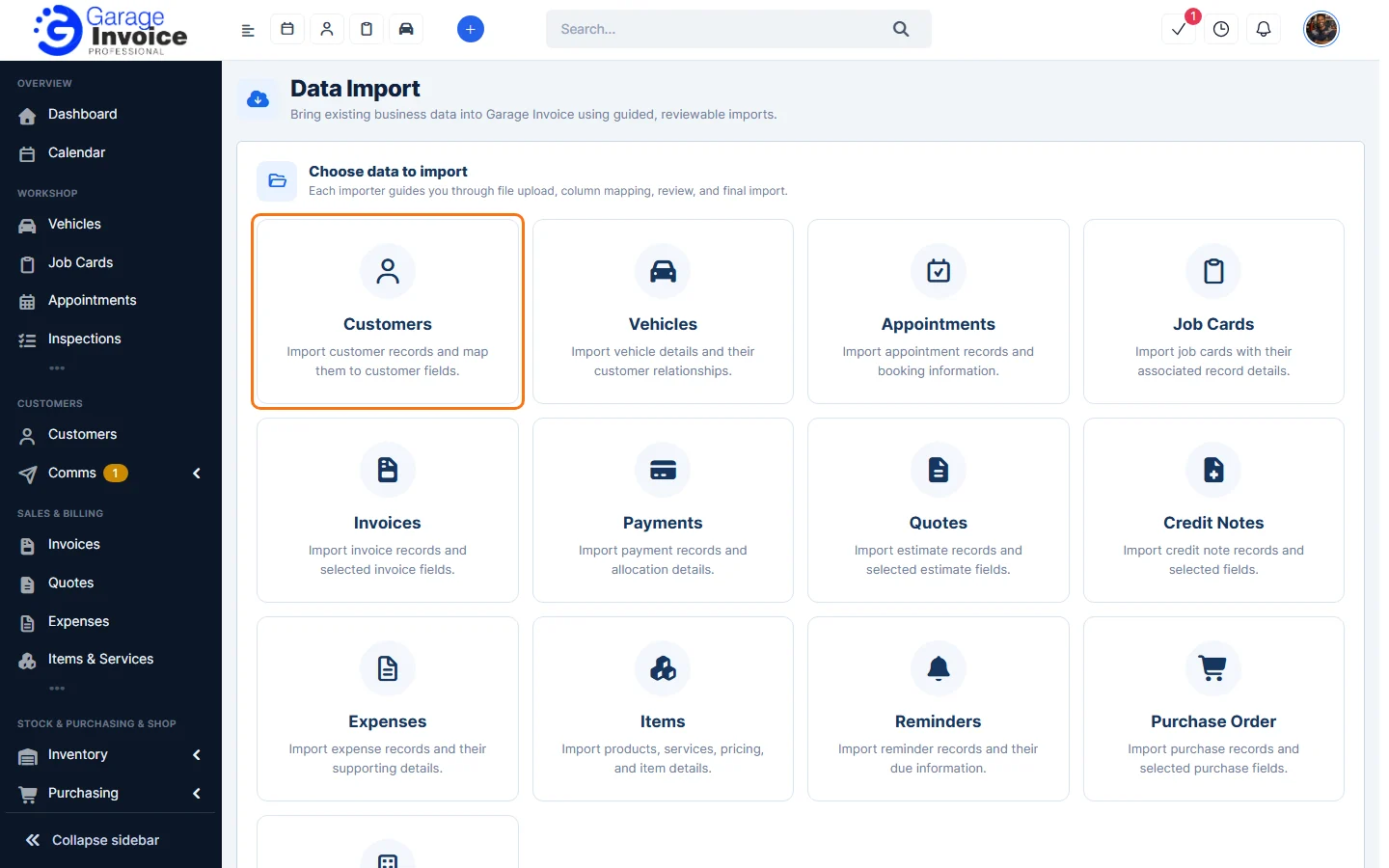
- Click Utilities & Data in the sidebar (under Administration) and choose Data Import. Click what you want to import.
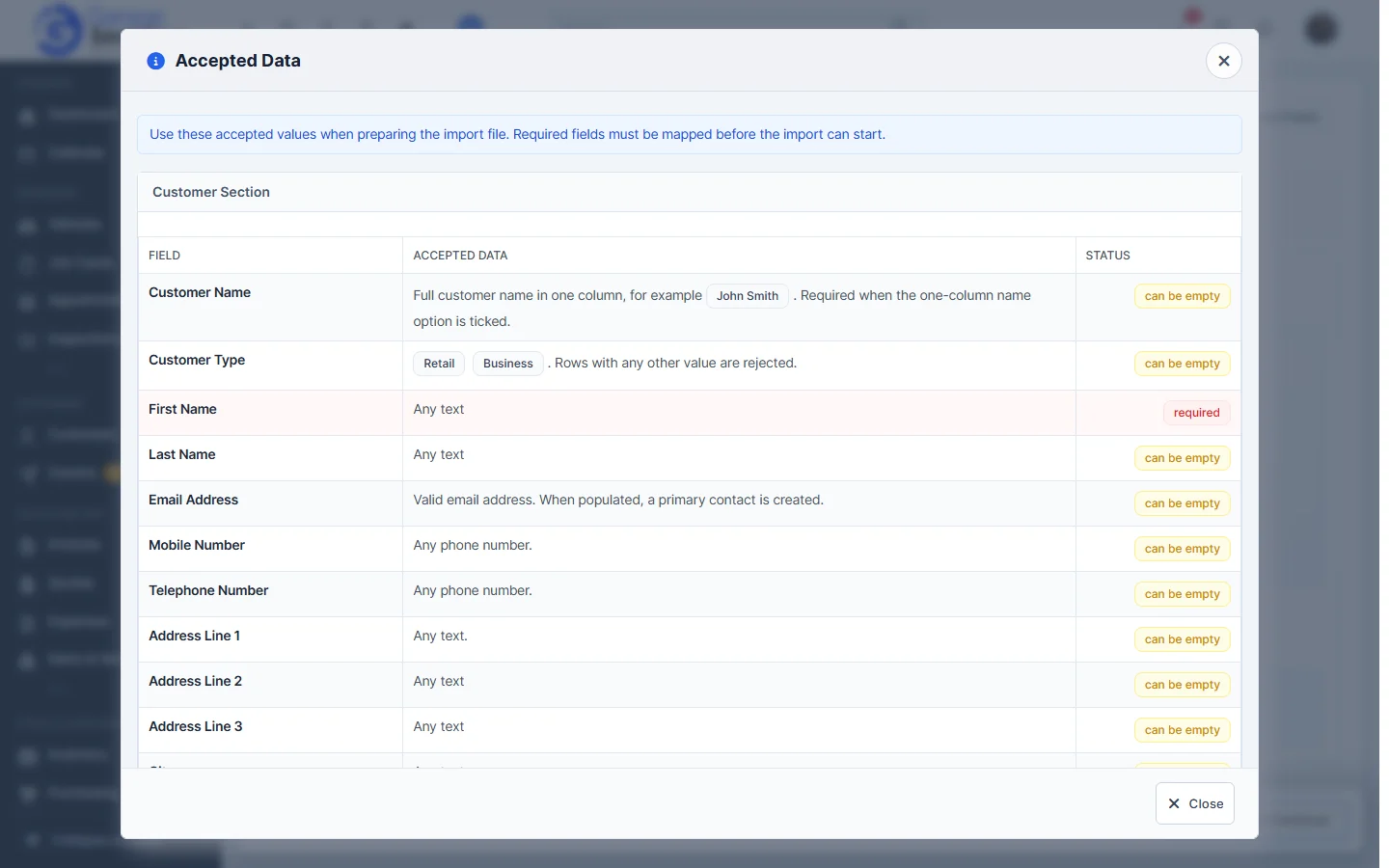
- Click View Accepted Fields to see every field you can import, what each one accepts, and which are required or can be empty. Fields are grouped in sections, such as Customer, Company, Vehicle and Line Item.
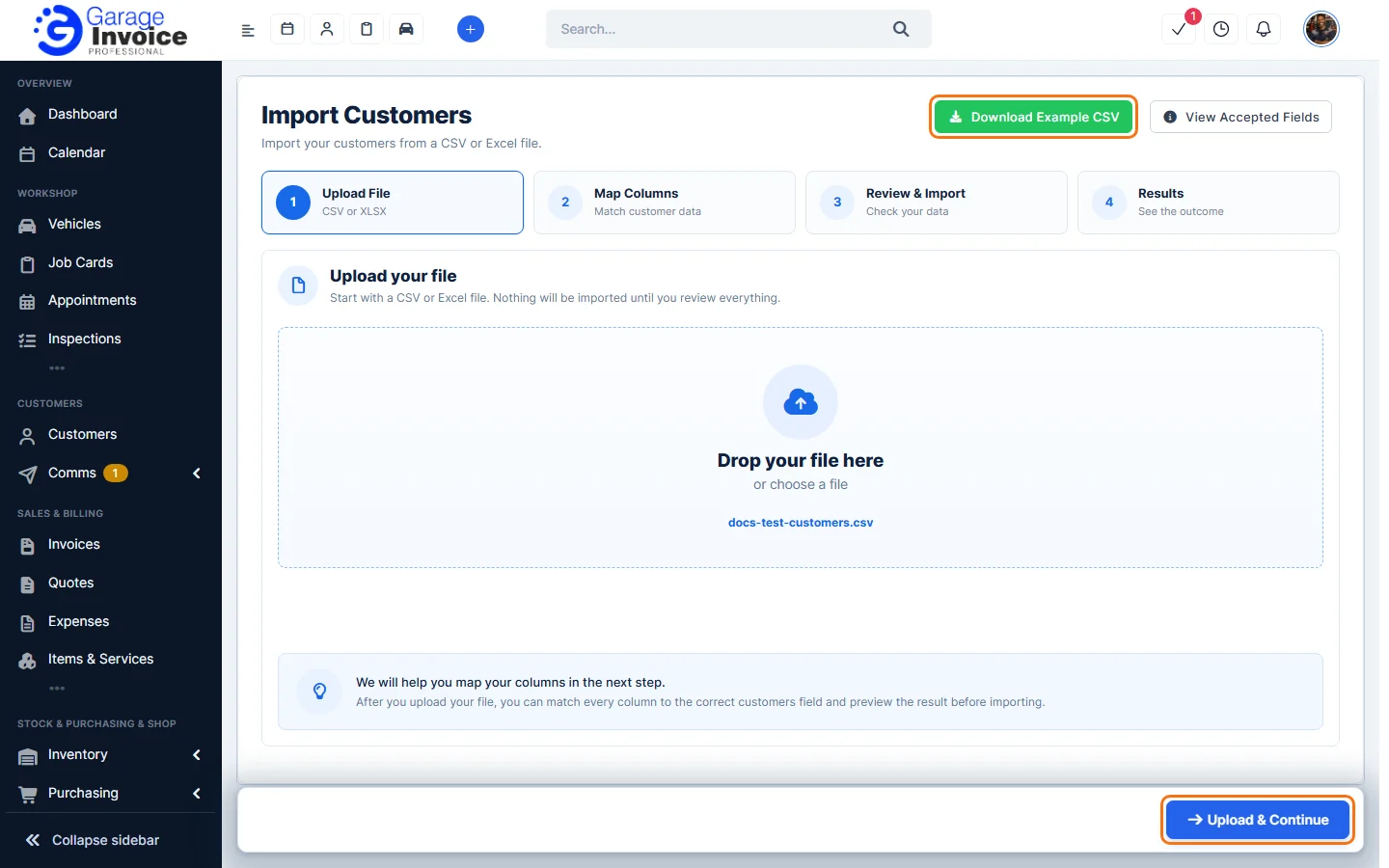
- Click Download Example CSV for a file with the right column headings. Fill it in with a spreadsheet program, or use your own file.
- Upload File: drop your file on the box or click Choose File. Accepted formats are CSV and XLSX (Excel). Click Upload & Continue.
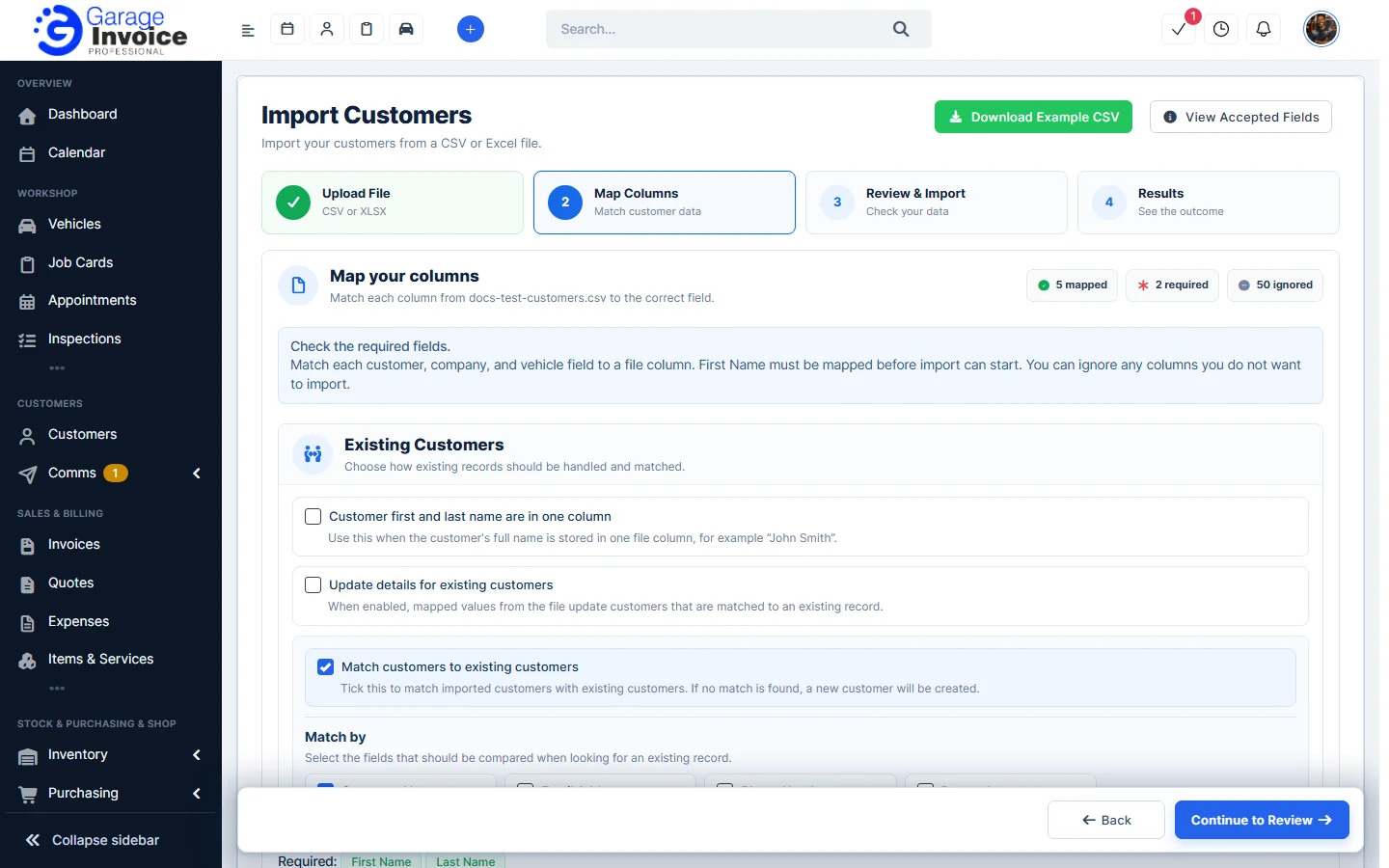
- Map Columns: Garage Invoice matches your columns to its fields and shows how many are mapped, required and ignored. Choose how existing records are handled, for example for customers:
- Customer first and last name are in one column: tick this if the full name, such as “John Smith”, is in one column.
- Update details for existing customers: values from the file update customers that match an existing record.
- Match customers to existing customers: matches imported rows with customers you already have. If no match is found, a new customer is created.
- Match by: the fields compared when looking for a match: Customer Name, Email Address, Phone Numbers or Postcode.
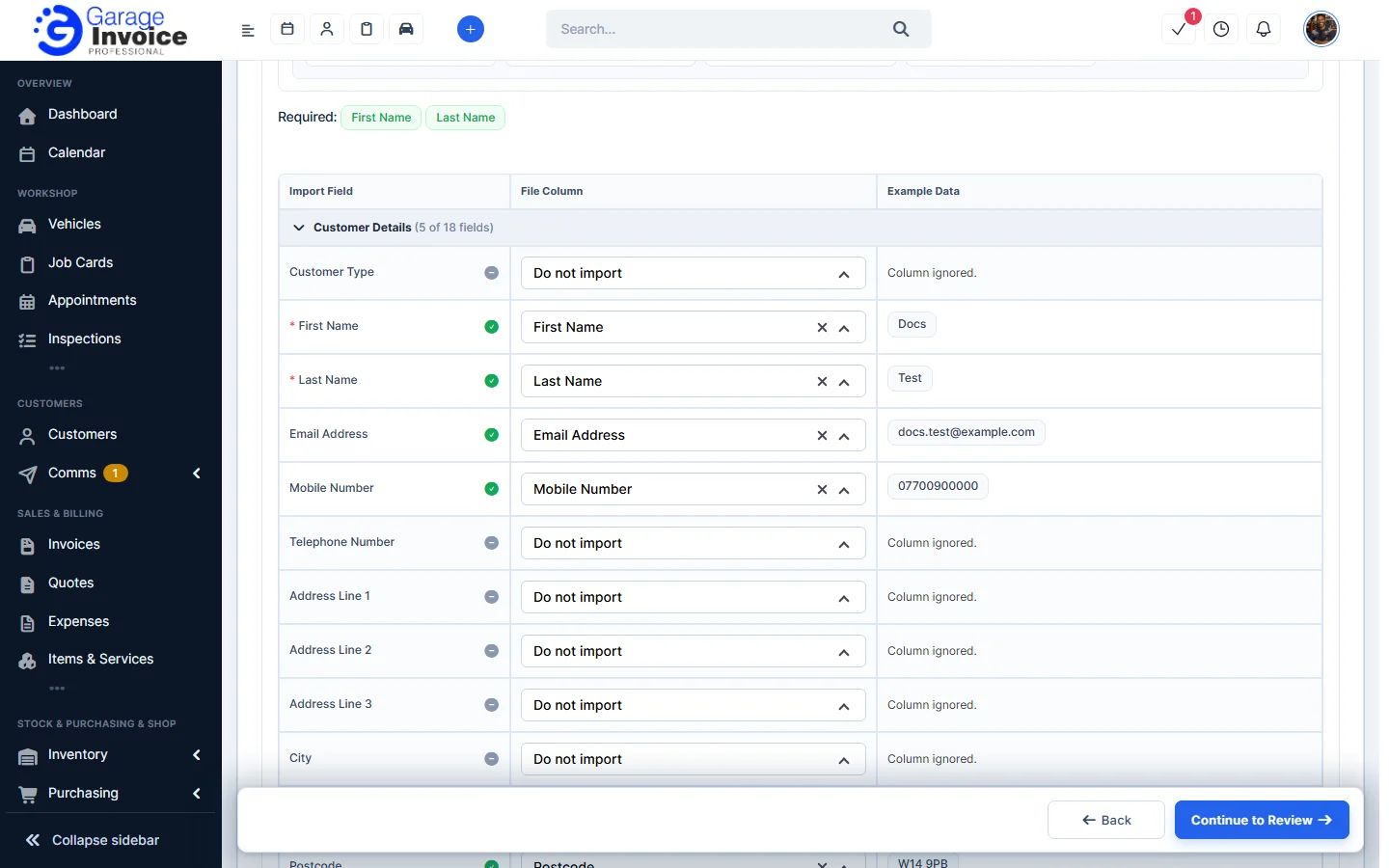
- In the table, check each Import Field against the File Column and the Example Data. Change a column in the list, or choose Do not import to skip it. All required fields must be mapped. Click Preview uploaded data to see your file, then Continue to Review.
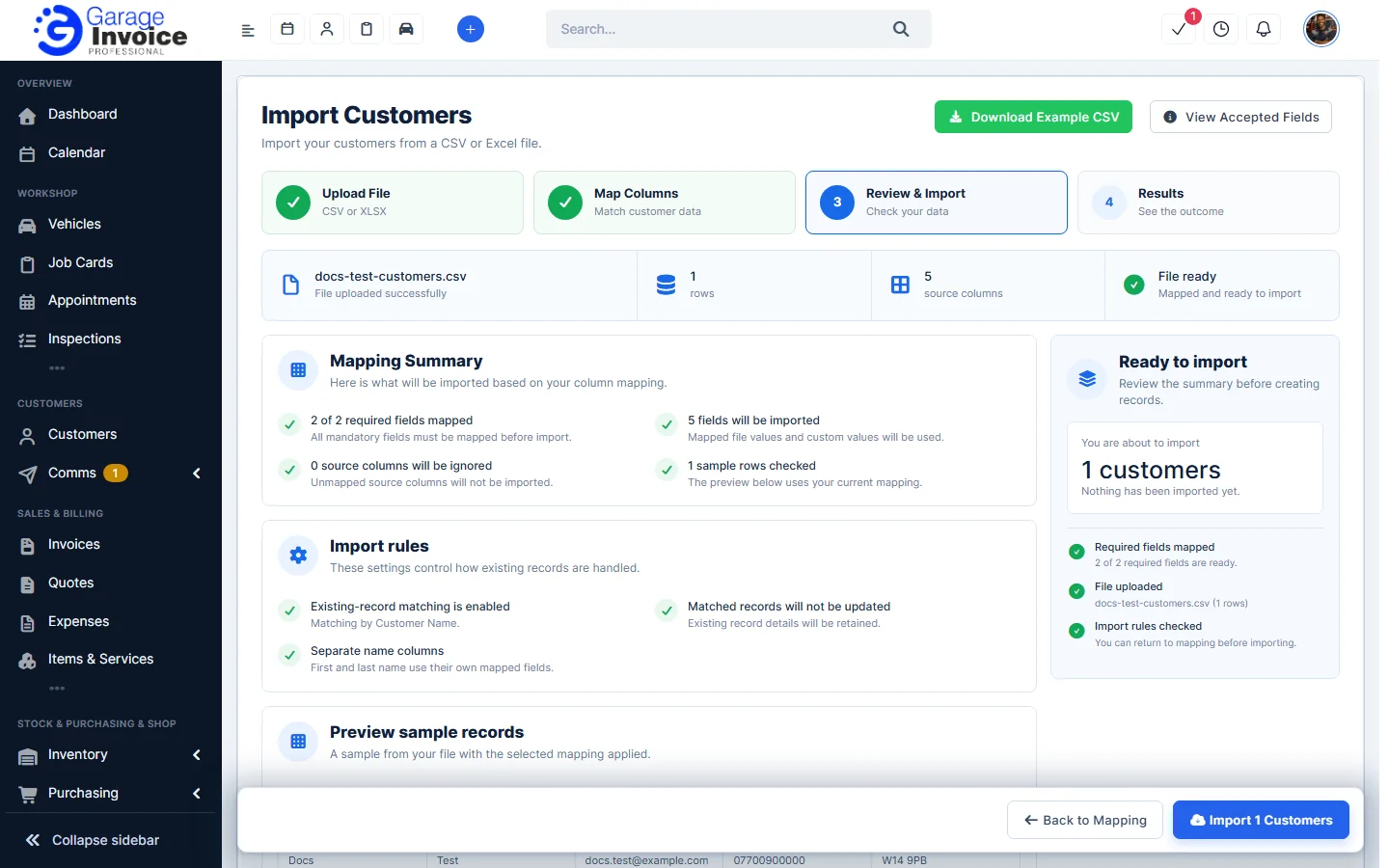
- Review & Import: check the Mapping Summary, the Import rules and the Preview sample records. Click Back to Mapping to change anything, or click the import button (for example Import 1 Customers).
- Results: shows the outcome of the import.
Tip: import customers first, then vehicles, then invoices, quotes and job cards, so they can be linked. Try a small file with a few rows first.
What you can import
Fields in bold are required. Dates in common formats and Excel date cells are detected; if a date is ambiguous you’re asked to confirm it. Values such as statuses and payment modes must match the ones set up in your Garage Invoice; for some, you match each value in the file to yours in an extra step before importing. The importers for jobs and sales documents can also find or create the customer and vehicle on each row.
Customers
Customer records with their contact, addresses, company and, if you like, one vehicle per row. Customer Type must be Retail or Business. Country accepts a name or code such as United Kingdom, UK, GB or IE. Customer Group takes group names or IDs separated by commas.
- Customer: Customer Name, Customer Type, First Name, Last Name, Email Address, Mobile Number, Telephone Number, Address Line 1, Address Line 2, Address Line 3, City, County, Postcode, Country, Customer Group, Website, Notes, Customer Status, Default Currency
- Contact: Contact Status, Position/Department
- Billing Address: Billing Country, Billing Address, Billing City, Billing County, Billing Postcode
- Shipping Address: Shipping Country, Shipping Address, Shipping City, Shipping County, Shipping Postcode
- Company: Company Name, Company VAT Number, Company Mobile Number, Company Telephone Number
- Vehicle: Registration Number, Vehicle Registration Country, Vehicle Make, Vehicle Model, Vehicle Year, Vehicle Colour, Vehicle Fuel Type, Vehicle Transmission, Vehicle Engine Size, VIN, Vehicle Notes, First Registered, Paint Code, Vehicle MOT Due Date, Vehicle Service Due Date, Front Tyre Width, Front Tyre Profile, Front Tyre Rim Size, Rear Tyre Width, Rear Tyre Profile, Rear Tyre Rim Size
Vehicles
Vehicles, linked to a customer. Makes are matched to the makes you already have (aliases such as Mercedes are recognised). Vehicle Fuel Type must be one of your fuel types, and Vehicle Transmission Manual or Automatic (codes such as 6MT, DSG or CVT are recognised).
- Vehicle: Registration Number, Vehicle Country, Vehicle Make, Vehicle Model, Vehicle Year, Vehicle Colour, Vehicle Fuel Type, Vehicle Transmission, Vehicle Engine Size, VIN, Vehicle Notes, First Registered, Paint Code, Vehicle MOT Due Date, Vehicle Service Due Date, Front Tyre Width, Front Tyre Profile, Front Tyre Rim Size, Rear Tyre Width, Rear Tyre Profile, Rear Tyre Rim Size
- Customer: Customer Name, First Name, Last Name, Email Address, Mobile Number, Telephone Number, Address Line 1, Address Line 2, Address Line 3, City, County, Postcode, Country, Customer Group, Website, Notes
- Company: Company Name, Company VAT Number, Company Mobile Number, Company Telephone Number
Appointments
Service Name must be a service set up in Appointments, and Provider a provider who offers it. Status can be a status name or number.
- Customer: Customer Name, First Name, Last Name, Email Address, Mobile Number, Telephone Number, Postcode, Company Name
- Vehicle: Registration Number, VIN, Vehicle Make, Vehicle Model, Vehicle Year, Vehicle Colour, Vehicle Fuel Type, Vehicle Transmission, Vehicle Engine Size, First Registered
- Appointment: Appointment Date, Appointment Time, Service Name, Provider, Status, Mileage, Service Details, Admin Notes
Job Cards
One row per item line. Line Type can be Item, Header or Text (a heading or text row). Tax Name(s) must match your tax rates.
- Customer: Customer Name, First Name, Last Name, Email Address, Mobile Number, Telephone Number, Postcode, Company Name
- Vehicle: Registration Number, VIN, Vehicle Make, Vehicle Model, Vehicle Year, Vehicle Colour, Vehicle Fuel Type, Vehicle Transmission, Vehicle Engine Size, First Registered
- Line Item: Type, Item Name, Item Description, Item Admin Note, Item Part Number, Item Supplier ID, Item Supplier, Item Qty, Item Unit, Item Rate, Item Line Discount Value, Item Line Discount Type, Tax %, Tax Name(s), Tax Breakdown
- Job Card: Job Card Number, Job Card Prefix, Job Card Date, Open Till, Start, End, Provider, Status, Job Card Discount %, Job Card Discount Type, Job Card Discount Total, Job Card Adjustment, Customer Instruction, Reported Defect, Completed Action, Technicians Comment, Aftercare Notes, Terms
Invoices
One row per item line, like job cards. Status (for example Unpaid, Paid or Partially Paid) and payment methods are matched to yours before importing. Payments can be included in the same file.
- Customer: Customer Name, First Name, Last Name, Email Address, Mobile Number, Telephone Number, Postcode, Company Name
- Vehicle: Registration Number, VIN, Vehicle Make, Vehicle Model, Vehicle Year, Vehicle Colour, Vehicle Fuel Type, Vehicle Transmission, Vehicle Engine Size, First Registered
- Line Item: Type, Item Name, Item Description, Item Admin Note, Item Part Number, Item Supplier ID, Item Supplier, Item Qty, Item Unit, Item Rate, Item Line Discount Value, Item Line Discount Type, Tax %, Tax Name(s), Tax Breakdown
- Invoice: Mileage, MOT No., Auth. No., Invoice Number, Status, Invoice Date, Due Date, Invoice Discount %, Invoice Discount Type, Invoice Discount Total, Invoice Adjustment, Admin Note, Client Note, Terms
- Billing Address: Billing Address, Billing City, Billing County, Billing Postcode
- Shipping Address: Shipping Address, Shipping City, Shipping County, Shipping Postcode
- Payment: Payments, Paid Amount, Payment Method, Payment Amount, Payment Date, Payment Reference Number, Payment Note
Payments
Payments for invoices that are already in Garage Invoice. Use Invoice ID or Invoice Number to link each payment; rows with an unknown invoice are rejected. An empty or unknown Payment Mode uses your first active payment mode.
- Customer: Customer Name, First Name, Last Name, Email Address, Mobile Number, Telephone Number, Postcode, Company Name
- Vehicle: Registration Number, VIN, Vehicle Make, Vehicle Model, Vehicle Year, Vehicle Colour, Vehicle Fuel Type, Vehicle Transmission, Vehicle Engine Size, First Registered
- Payment: Invoice ID, Invoice Number, Amount, Payment Date, Payment Mode, Transaction ID, Note
Quotes
One row per item line. Status can be Draft, Ready, Sent, Expired, Declined or Accepted.
- Customer: Customer Name, First Name, Last Name, Email Address, Mobile Number, Telephone Number, Postcode, Company Name
- Vehicle: Registration Number, VIN, Vehicle Make, Vehicle Model, Vehicle Year, Vehicle Colour, Vehicle Fuel Type, Vehicle Transmission, Vehicle Engine Size, First Registered
- Line Item: Type, Item Name, Item Description, Item Admin Note, Item Part Number, Item Supplier ID, Item Supplier, Item Qty, Item Unit, Item Rate, Item Line Discount Value, Item Line Discount Type, Tax %, Tax Name(s), Tax Breakdown
- Billing Address: Billing Address, Billing City, Billing County, Billing Postcode
- Shipping Address: Shipping Address, Shipping City, Shipping County, Shipping Postcode
- Quote: Quote Number, Status, Reference No, Quote Date, Expiry Date, Quote Discount %, Quote Discount Type, Quote Discount Total, Quote Adjustment, Admin Note, Client Note, Terms
Credit Notes
One row per item line. Status can be Open, Closed or Void.
- Customer: Customer Name, First Name, Last Name, Email Address, Mobile Number, Telephone Number, Postcode, Company Name
- Vehicle: Registration Number, VIN, Vehicle Make, Vehicle Model, Vehicle Year, Vehicle Colour, Vehicle Fuel Type, Vehicle Transmission, Vehicle Engine Size, First Registered
- Line Item: Type, Item Name, Item Description, Item Admin Note, Item Part Number, Item Supplier ID, Item Supplier, Item Qty, Item Unit, Item Rate, Item Line Discount Value, Item Line Discount Type, Tax %, Tax Name(s), Tax Breakdown
- Billing Address: Billing Address, Billing City, Billing County, Billing Postcode
- Shipping Address: Shipping Address, Shipping City, Shipping County, Shipping Postcode
- Credit Note: Credit Note Number, Status, Reference No, Credit Note Date, Credit Note Discount %, Credit Note Discount Type, Credit Note Discount Total, Credit Note Adjustment, Admin Note, Client Note, Terms
Expenses
Category and Payment Mode must match the ones set up in Garage Invoice. Billable takes Yes or No.
- Customer: Customer Name, First Name, Last Name, Email Address, Mobile Number, Telephone Number, Postcode, Company Name
- Vehicle: Registration Number, VIN, Vehicle Make, Vehicle Model, Vehicle Year, Vehicle Colour, Vehicle Fuel Type, Vehicle Transmission, Vehicle Engine Size, First Registered
- Line Item: Type, Item Name, Item Description, Item Admin Note, Item Part Number, Item Supplier ID, Item Supplier, Item Qty, Item Unit, Item Rate, Item Line Discount Value, Item Line Discount Type, Tax %, Tax Name(s), Tax Breakdown
- Expense: Invoice Number, Expense Name, Reference No, Note, Invoice Date, Category, Payment Mode, Billable
Items
Your parts, labour, tyres and other items, including purchase prices, stock, online shop and POS details. Item Type must be one of your item types, for example Labour, Parts, Tyres, Consumables, Subcontract or Bundle Item. See also Import and Export Items.
- Fields: Item Details, Item Type, Is Bundle, Description, Long Description, Price, Price Incl Tax, VAT, Purchase Price, Purchase Price Incl Tax, Purchase VAT, Unit, Item Group, Item Sub Group, Duration, Supplier, Tyre Width, Tyre Brand, Tyre Profile, Tyre Rim, Tyre Speed, Tyre Season, Tyre Fuel, Tyre Wet, Tyre Noise, Stock Control, Current Stock, Warehouse Name, Item Location, Item Code, Item Barcode, SKU Code, SKU Name, Online Shop, Shop Price, Shop Price Incl Tax, Shop Recommended Retail Price, Shop Discount, Shop Discount Type, Shop Long Description, Shop Model, Shop Style, Shop Size, Shop Colour, Shop Warranty (months), Shop Weight, Shop Length, Shop Width, Shop Height, Shop Shipping, Shop Collection, Shop Shipping Fee, Images, POS System, POS Price, POS Price Incl Tax, POS Recommended Retail Price, POS Discount, POS Discount Type
Reminders
Reminder Type can be SERVICE or CUSTOM (empty means CUSTOM). Assigned To must be the full name of an active staff member; empty assigns the person running the import.
- Customer: Customer Name, First Name, Last Name, Email Address, Mobile Number, Telephone Number, Postcode, Company Name
- Vehicle: Registration Number, VIN, Vehicle Make, Vehicle Model, Vehicle Year, Vehicle Colour, Vehicle Fuel Type, Vehicle Transmission, Vehicle Engine Size, First Registered
- Reminder: Reminder Date & Time, Description, Reminder Type, Staff ID, Assigned To, Notify By Email
Purchase Orders
Purchase orders with their lines and supplier (vendor). An empty or unknown Currency uses your base currency.
- Line Item: Item Description, Long Description, Quantity, Rate, Currency
- Vendor: Vendor ID, Vendor Name, Vendor Email
- Purchase: Order Number, Order Name, Order Date, Delivery Date, Vendor Note, Terms
Vendors (Suppliers)
Suppliers with their addresses, bank details, payment terms and main contact. With Match by, a vendor with the same ID or name is updated instead of a new one being created.
- Vendor: Vendor ID, Vendor Name, Vendor Code, VAT Number, Mobile Number, Telephone Number, Website, Currency, Vendor Category
- Address: Address, City, County, Postcode, Country
- Billing Address: Billing Address, Billing City, Billing County, Billing Postcode, Billing Country
- Shipping Address: Shipping Address, Shipping City, Shipping County, Shipping Postcode, Shipping Country
- Other: Bank Details, Payment Terms
- Primary Contact: Contact First Name, Contact Last Name, Contact Email, Contact Phone, Contact Position
To get data out of Garage Invoice, see Data Export.