Appointments
Organise the day and take bookings online, around the clock.
Workshop software for the UK & Ireland
Online bookings, inspections, job cards, invoices and reports in one place.
Explore a working demo garage with example data. No registration or card needed.
“Excellent value for money. Easy and logical to use… Batch payments is now saving me a fortune in time and effort.”
“The system is simply amazing… Certainly recommend this to everyone I speak to.”
“Garage Invoice, hands down has the best customer support. Response is quick no matter time and regardless of weekends.”
“As a new business this software is brilliant!”
“Best company I have dealt with to date… Value for money 100%. Ease of use 100%.”
“This allows us to centralise all our information in one system. The transition is straightforward.”
“Would gladly recommend to any other small independent garage!”
“The more I look the more I find on there even after years of use.”
“System is reliable, user friendly and vibrant in design.”
“Does a lot of the things the bigger more expensive alternatives do at a much cheaper price.”
“It has so much included that other companies charge per use.”
“We look forward to integrating our business with Garage Invoice in the future.”
“…it’s the pillar of our customer management and invoicing, we would struggle without it. I would recommend it to anybody.”
“Really helpful, easy to get hold of when needed and a good user friendly system.”
“Very easy to use and the customer support is very good.”
“Fantastic, the best garage software I have used so far, easy and very reliable with a very good support.”
“Any issues I have had have been dealt with very quickly indeed.”
“Excellent software easy to use.”
“Great invoicing software for Auto Garages.”
One system for the whole job
Our garage management software keeps bookings, inspections, job cards and invoices connected, so you spend less time entering the same details.
Organise the day and take bookings online, around the clock.
Record the vehicle's condition and price the work it needs.
Turn the completed job card into an invoice in one click.
Let customers book. Keep your diary organised.
Customers book an MOT or service themselves, any time of day. Each booking request appears in your appointments list for you to review and confirm.
Works with your current website. Add the booking form to the website you already have, or share a direct link, for example on your Facebook page.
Step 3 of 5 · Date & time
Choose a day
Drop-off time
This is your vehicle drop-off time. Work may begin later depending on the workshop schedule.
ContinueExample screens with sample data
Interior / Exterior
Notes: nearside brake light bulb out. Wipers smearing.
Tyres
Example screen with sample data
Record findings while you're beside the vehicle.
Work through the vehicle inspection checklist on a tablet in the bay, add recommended repairs and their prices, and send it to the customer to accept.
Any device
Use Garage Invoice in your browser on desktop, tablet or mobile. Your whole team can be logged in at once.
Swipe to explore desktop, tablet and mobile.
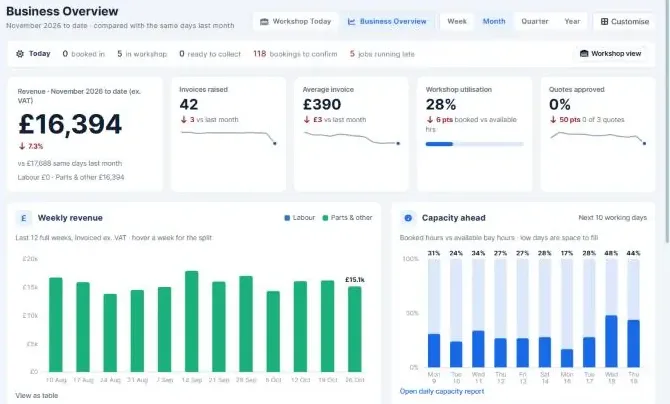
Bookings, invoices, payments and reports on the office PC.
MOT test · pass
Oil & filter, 5W-30
Wiper blades
Completed action: nearside brake light bulb replaced.
Convert to invoiceJob cards and inspections on a tablet, with photos from the camera.
New invoice
For mobile mechanics: look up the reg, invoice and send it from your phone.
How it works
Booked
In the workshop
Ready
Invoiced
Stage 1 of 5 · Booked online
Example screen with sample data
Know where your workshop makes money.
Set a target margin, then see which services, items, customers and vehicles fall below it. Reports use the job information you already record in Garage Invoice.
Reports / Profit & Margin
Profit & Margin
Profit & Margin compares every category, item, customer and vehicle against your own target margin, and flags anything sold at a loss.
Sales reports show the work each team member has brought in over any period.
Customer reports group unpaid invoices by how overdue they are, and the Cashflow report sets income against expenses.
Everything else
Keep customer records, vehicle history, jobs, payments and stock connected, so your team spends less time searching and entering the same information.
Create branded invoices, send them by email or SMS, and track unpaid balances. Record part payments or several payments at once.
Assign work to technicians and keep job details, notes, photos and videos together. Turn completed job cards into quotes or invoices.
Send estimates for customers to review, approve and sign online. Track when they’re viewed and turn accepted work into an invoice.
Keep customer details together and find their linked vehicles, jobs and invoices without searching through separate records.
Enter a registration to retrieve vehicle details, then keep inspections, jobs, invoices and reminders linked to that vehicle.
Send automatic email and SMS reminders when work is due, using your own wording to encourage customers to book again.
Keep track of parts, stock levels and purchasing alongside the work happening in your garage.
Record business expenses and create credit notes when invoice amounts need adjusting, keeping the financial records together.
Use integration or export options for QuickBooks, Xero, Sage and FreeAgent. Available connection methods depend on your accounting package.
Pricing
Both plans include all the features shown above. Pay monthly, or save with an annual plan. No long-term contract: cancel before your next renewal and you won't be charged again.
Pay as you go
£50 /month
Excl. VAT
2 months free every year
Best value
£500 /year
Excl. VAT
Choose a plan
Pay monthly or annually by debit or credit card, PayPal or Direct Debit.
Card · PayPal · Direct DebitFill in the setup form
Tell us your business name and address, and upload your logo.
Takes about 3 minutesStart using Garage Invoice
We set up your account as soon as we receive your form, ready to create your first job.
Ready in under 15 minutesFAQ
Yes. Explore the live demo with example garage data—no registration or payment card needed. Choose a demo user on the sign-in screen to look around and try the features before choosing a plan. We offer a shared demo rather than a free trial of your own account.
Both monthly and annual plans include the same features, including online booking, inspections, job cards, invoicing and reporting, with unlimited staff logins. Prices exclude VAT. Unlimited SMS uses the GI SMS gateway and requires your own Android phone; check the SMS requirements before getting started. Any applicable payment-provider fees or optional service charges are separate from your subscription.
Yes—we can import your customers, vehicles, appointments, job cards, invoices, payments, estimates, credit notes, expenses, items and vendors at no extra charge. Contact us with the name of your current system, and we’ll explain how to prepare your data for import.
Choose a monthly or annual plan, then send us your business details and logo. Once we have those details, we’ll set up your account in less than 15 minutes and let you know it’s ready to use. Our documentation and support team are available to help you get started.
Yes. Garage Invoice runs in your web browser on desktop computers, tablets and mobile phones, with an internet connection. Use a tablet for job cards and inspections in the workshop, or look up a vehicle and send an invoice from your phone while working away from the office.
Yes. Add the booking form to your existing website or share a direct booking link, including on your Facebook page. Customers select a service and drop-off time, then submit their details. You review and confirm each booking request, so you stay in control of your diary.
Garage Invoice supports SMS messages for appointments, vehicle collection and MOT or service reminders. The included unlimited SMS option uses the GI SMS gateway with your own Android phone. You’ll need a suitable mobile plan, and your mobile provider’s charges and usage conditions still apply. Contact us if you need help checking the requirements.
Cancelling and accessYou can cancel your subscription through My Account on our website. You keep full access until the end of the period you’ve already paid for. After that, normal access ends, but account administrators can still sign in to export your data while it remains available.
Exporting your recordsUse Utilities → Export All Data to download your records as CSV files for Excel or Google Sheets. This includes customers, vehicles, appointments, job cards, invoices, quotes, payments, expenses and other business records. Invoices, job cards, quotes and other supported documents can also be downloaded in bulk as PDFs in a ZIP file.
ReactivatingIf you decide to return while your data is still retained, select Reactivate Subscription to restart on the same plan.
Data retentionAfter your access ends, your data is kept for one month, so administrators can still export it or you can reactivate. After that month, it is permanently deleted. Backup copies are kept for 30 days.
Staff accessEach staff member has their own login, and you control what they can view, create, edit or delete. Access can be restricted to records they created or were assigned, while technicians have a simpler workspace for their own job cards, appointments and tasks. You can deactivate a staff account to end their access, including remembered logins. An Activity Log helps you review actions taken in your account.
Login protectionPasswords are securely hashed. Two-factor authentication and passkeys are supported, and administrators can require two-factor authentication for everyone.
Data protection and backupsYour data travels over encrypted HTTPS connections, and sensitive integration settings are encrypted. Your database is backed up automatically every four hours by default, with integrity checks and off-server cloud storage. Backups are kept for 30 days, and an additional backup is taken before each system update.
Garage Invoice offers accounting integration or export options for QuickBooks, Xero, Sage and FreeAgent. The connection method and supported information depend on the accounting package. Contact us with the software you use, and we’ll confirm how the connection works and any setup requirements or additional costs.
Contact us—we’ll help you work out whether Garage Invoice fits your workshop.
Open the demo garage, or pick a plan and we'll set your account up for you.
