
Export the file from Garage Invoice
- Click Reports in the sidebar (under Insights) and click Accounting Export. and click QuickBooks.
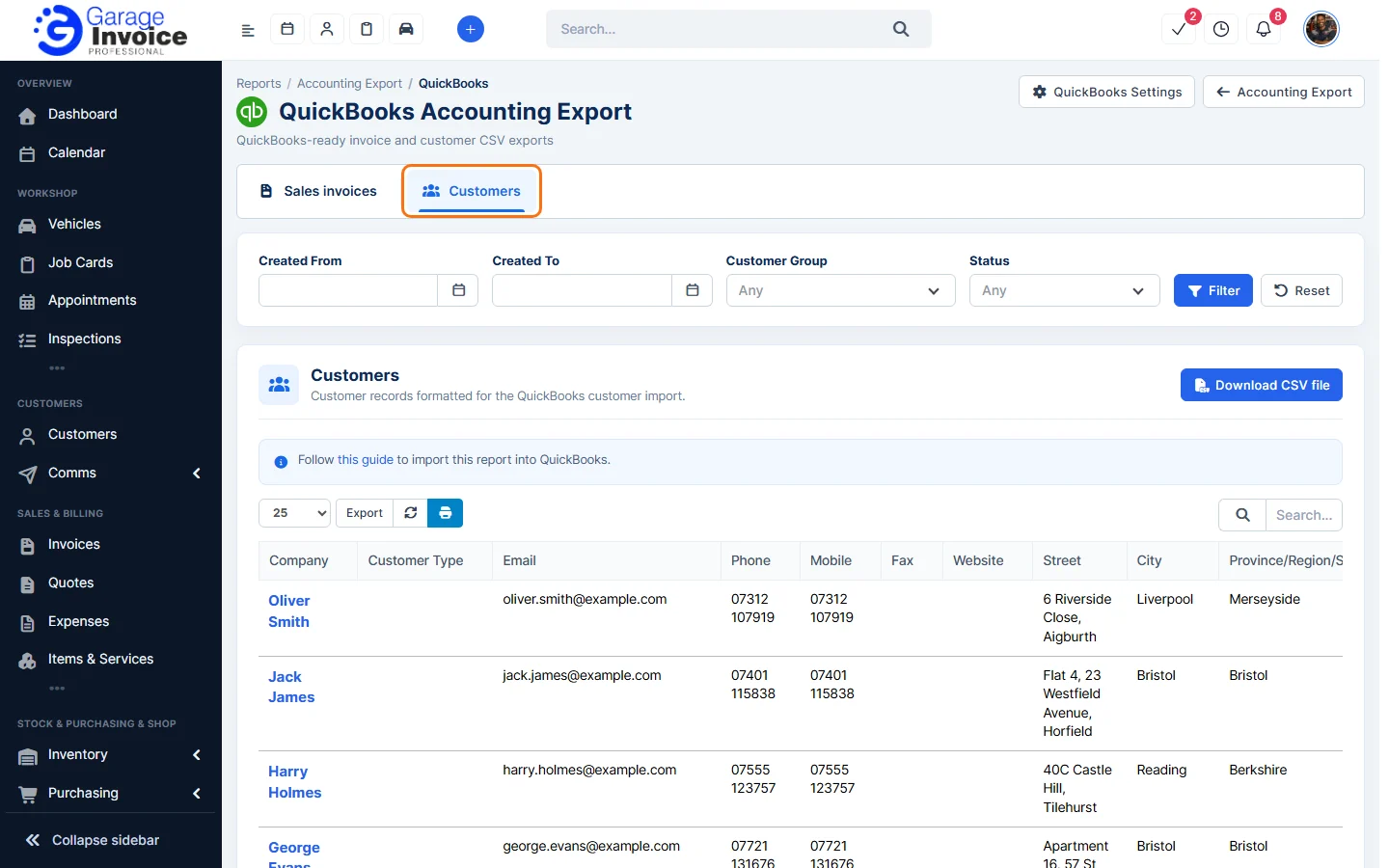
- Click the Customers tab. Filter by Created From / Created To, Customer Group and Status if you only want some customers, and click Filter.
- Check the list, then click Download CSV file and save the file.
Import the file into QuickBooks
- Log In to QuickBooks:
- Access your QuickBooks account and log in.
- Click on the Gear Icon in the upper-right corner.
- Select the Import Data option from the menu.

- Select the Data Type:
- Click on the Customers tile to begin the import process.

- Upload the CSV File:
- Click Browse and select the CSV file you exported from Garage Invoice.

- Click the Next button.

- Map the Columns:
- QuickBooks will automatically map the columns from your CSV file.
- Click Next to proceed.

- Review and Confirm:
- The next screen will show you how many customers are ready to be imported.
- Review this information carefully. Invalid fields will get marked in red.
- Click the Import button when you’re ready.

- Complete the Import:
- Your customers will now be imported into QuickBooks.

- Note: Any duplicate customers that already exist in QuickBooks will not be imported to avoid conflicts.


Feature Garage reports: see what it does and how it fits your workshop.