
- Open a new or existing invoice, quote or job card. In the items table (Invoice Items, Quote Items or Job Card Items), click in Search or type a new.
- Search Items & Services opens. Before you type, it lists your favourite items. Type part of the name to search all items. Each result shows the type, item name, description, part number, purchase price, net price, total price (incl. tax) and stock.
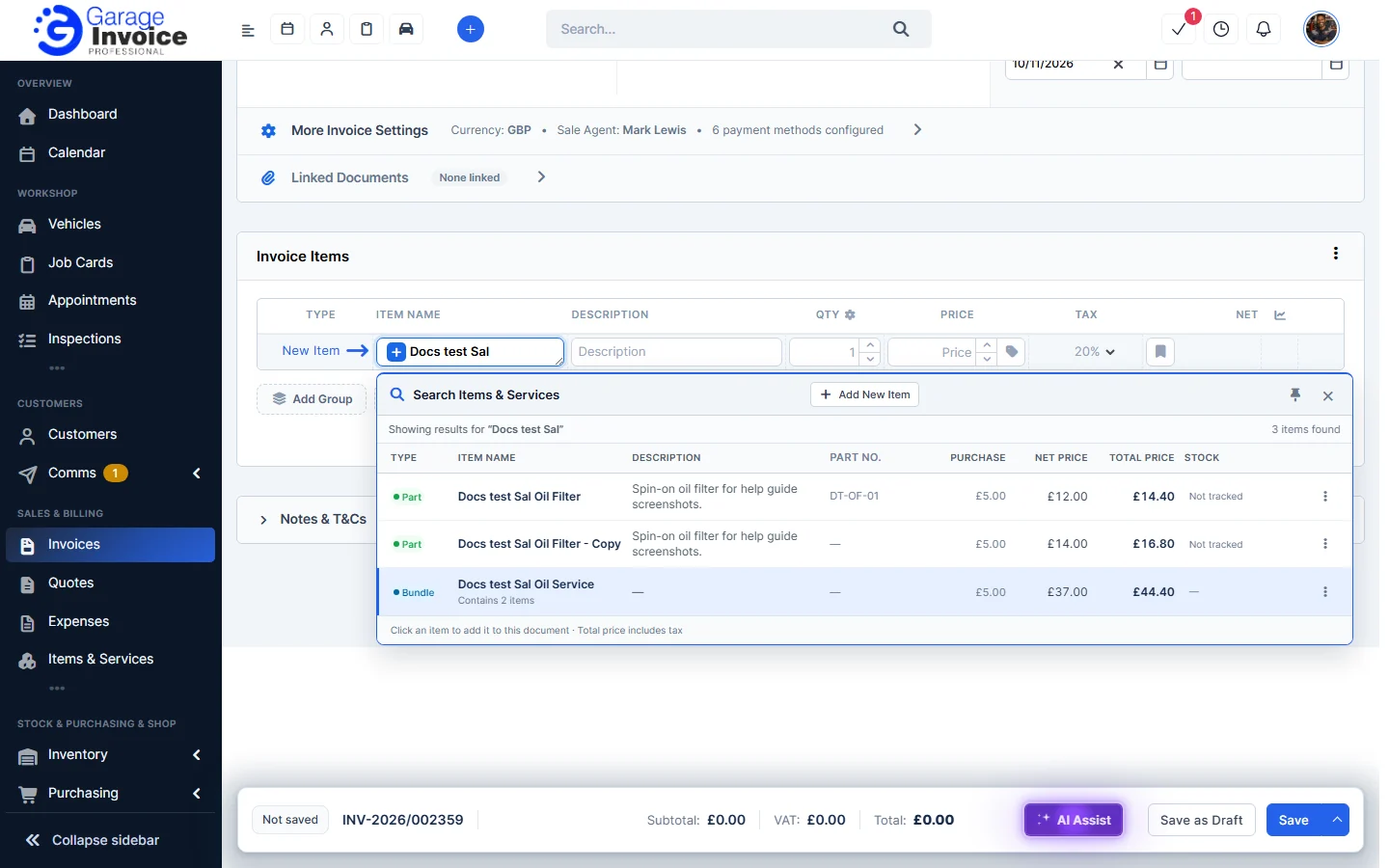
- Click an item to add it. Its name, description, quantity, price and VAT are filled in.
- Change the quantity, price, discount or tax on the line if you need to. The change only applies to this document.
- To add something that isn’t in your list, type it and press Enter, or click Add New Item in the search window to add a new item to your list.
Note: whether out-of-stock items can be added, or are hidden from the search, is set in Sales Configuration. See Sales Configuration.
See also: Add New Invoice · Add New Quote · Create Job Card · Sales Report: Items
Feature Stock and inventory control: see what it does and how it fits your workshop.