At half past ten, the rear brakes are half done and the parts van is late. The phone rings. Reception wants to know whether to promise a one o’clock collection, and the technician wants to know which job comes next. A useful workshop board answers both questions quickly enough that nobody has to walk round looking for the owner.

You can build it on a whiteboard or on screen. Start with the decisions the team makes every day. What’s ready? What’s occupying a ramp? Who has the next action? Which customer needs an update? Give people a short way to answer those questions as the work changes.
In The Motor Ombudsman’s review of 2025, 54% of 85 responding UK repair businesses reported repairs delayed by parts shortages. The survey covered independent garages and franchise workshops. Each shop will have its own mix of delays. A board is where you make a particular delay visible in time to move a job, chase an order or change a collection promise. Suzuki’s UK aftersales guide describes both manual and electronic approaches to tracking jobs and technician allocation, including the use of a visual planning board.
Sources: The Motor Ombudsman’s 2025 workshop survey · Suzuki UK aftersales best practice guide
Give each column a meaning the whole team can use. If one adviser moves the card when the customer arrives and the other waits until parts are checked, the same board will tell two different stories.
| Column | Move a card here when |
|---|---|
| Booked | The appointment is due and the vehicle hasn’t checked in. |
| Ready | The vehicle is available and you’ve checked scope, authorisation, parts and anything else needed to start. |
| In progress | Someone has started the agreed work. Show who and which bay if it matters. |
| Waiting | The next step depends on something identifiable. Add what’s missing, who will chase and the next check time. |
| Final checks | The work is complete and the relevant checks and paperwork are still due. |
| Ready to collect | The vehicle has been cleared for handover and reception knows it can give the customer a collection update. |
Your shop may need a separate diagnosis stage, or a marked location for cars that have already gone. Give a new column a trial when it would help someone make a different decision. If repairs routinely come back from final checks for a correction, move the card back to the stage that reflects the work and leave the reason on the job card.
A card should tell someone enough to act. Start with a job number, a short description, the person responsible for the next action, and a time. Show the vehicle’s location when that affects the next move. Keep full customer details, approvals and technical notes on the job record. Put a physical board where staff can use it and customers cannot read it from reception. If you use a screen, think about who can see it and what they need to see. The ICO’s data minimisation principle is a useful check when choosing what to display.
Source: ICO guidance on data minimisation
Put PARTS, APPROVAL or another short reason beside a waiting job. At a glance, “Waiting” says there’s a problem. “PARTS · Jo checks 11:00” tells someone what should happen next. Add whether the vehicle can move or is still occupying the bay. A car can be waiting on a customer and still block the only lift that can take the next van.
There will be afternoons when the person who owns the action is on the phone to somebody else. Agree who covers the check and where the answer goes. This is particularly important when the customer approves extra work or changes the scope. Keep a time-stamped record of what was agreed and update the board with the operational consequence. The Motor Ombudsman’s Service and Repair Code is a reference for accredited garages on agreeing additional work and keeping customers informed.
Source: The Motor Ombudsman Service and Repair Code

For jobs stuck on parts, see how to keep repairs moving when you’re waiting for parts.
At 10:30, this fictional two-bay garage has seven jobs in play. Maya is finishing a service in Bay 1. Sam was going to be tied up with rear brakes in Bay 2, but the correct parts are late. After the technician confirmed the vehicle could safely be moved using the garage’s agreed method, it went to parking space P2. Bay 2 is free. Here’s what the board shows just before Sam starts the next job.
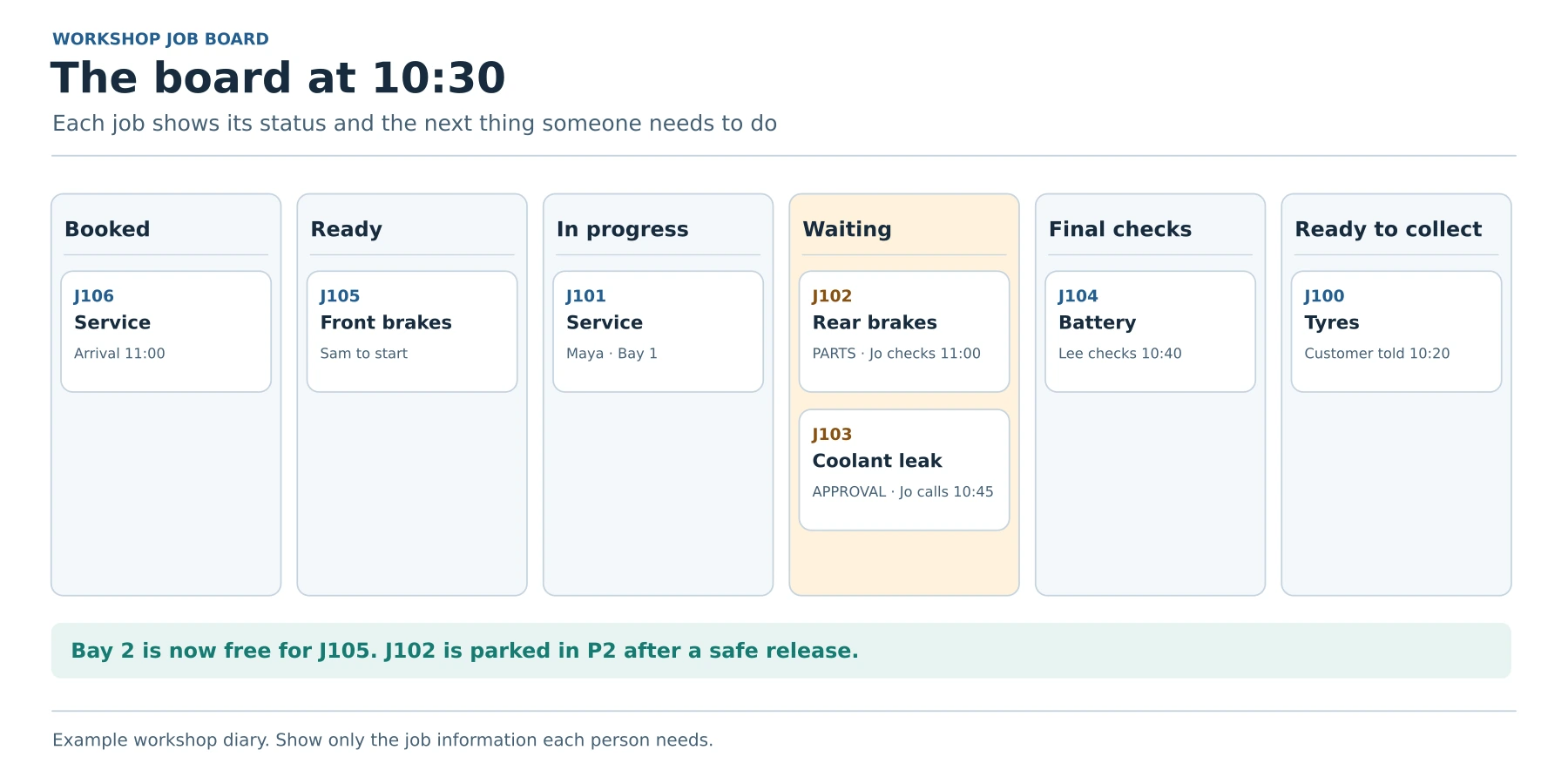
| Job | Where it sits at 10:30 | Next action |
|---|---|---|
| J106 Service | Booked | Arrival due at 11:00. |
| J105 Front brakes | Ready | Sam to start in Bay 2. |
| J101 Service | In progress | Maya to finish the work in Bay 1. |
| J102 Rear brakes | Waiting for parts | Vehicle in P2. Jo checks the delivery at 11:00. |
| J103 Coolant leak | Waiting for approval | Jo calls the customer at 10:45. |
| J104 Battery | Final checks | Lee checks the job at 10:40. |
| J100 Tyres | Ready to collect | Customer was told at 10:20. |
When Sam starts J105, the card moves to In progress with Sam and Bay 2 shown. The parts job stays visible with the 11:00 check assigned to Jo. If the supplier says noon instead, Jo checks whether the new arrival time is compatible with the existing diary and updates the customer before making a fresh collection promise. If the delayed car couldn’t have moved, the board would show Bay 2 occupied and the adviser would need a different plan.
At 10:45, Jo calls about the coolant leak. If the customer needs time to think, Jo records the next agreed check and leaves the job waiting. If the customer authorises the work, Jo records what they approved and checks whether the parts, technician and bay are ready before moving it. That gives the team an accurate picture of what is authorised and what can start.
At opening, take a few minutes to look at first arrivals, parts already on site and the jobs that have to leave early. During the day, move a card when the work changes hands. The technician can mark a job waiting and say why. The adviser can record an approval, move the job when the team can start, and tell the customer if the collection time slips. At close, give every live card an owner and a first action for the next morning. Put actual handover or closure in the job record so last week’s collected vehicles don’t fill today’s board.

Use one shared record for decisions. It can be a whiteboard and written job cards with an agreed update routine, or a digital board tied to the job card. Avoid running two independent lists that both claim to show live progress. In Garage Invoice, the Job Cards pipeline can group cards by status or workshop stage. Its Workshop Today dashboard gives staff a separate view of progress and the day’s work by bay. The sample columns here are a model for your workflow. Check your account’s settings and choose the view that fits the shop.
Read more: Garage Invoice Job Cards pipeline guide · Workshop Today dashboard
Start the trial with tomorrow’s jobs and carry over only active work that needs an action. At the end of the first week, check three things.
Suppose eight waiting jobs appear during the trial and only three have an owner and a deadline. That leaves five jobs someone has to rediscover. If seven out of eight have both in the next comparable week, four more jobs have a clear next action. Look at whether staff actually made those calls or checks at the agreed times. If the answers improve, keep the steps that caused the improvement. If the board is covered in notes nobody reads, remove a field or agree who is meant to update it. A board earns wall space when it saves the conversation you keep having five times a day.
